> ## Documentation Index
> Fetch the complete documentation index at: https://www.minitap.ai/docs/llms.txt
> Use this file to discover all available pages before exploring further.
# Reading a run report
> The per-story view — verdict, criteria, video, and the fix prompt you paste into Cursor or Claude.
A run report is the per-story view: one user story, one build, one
device. Open it from the run view by clicking any row.
 ## Verdict header
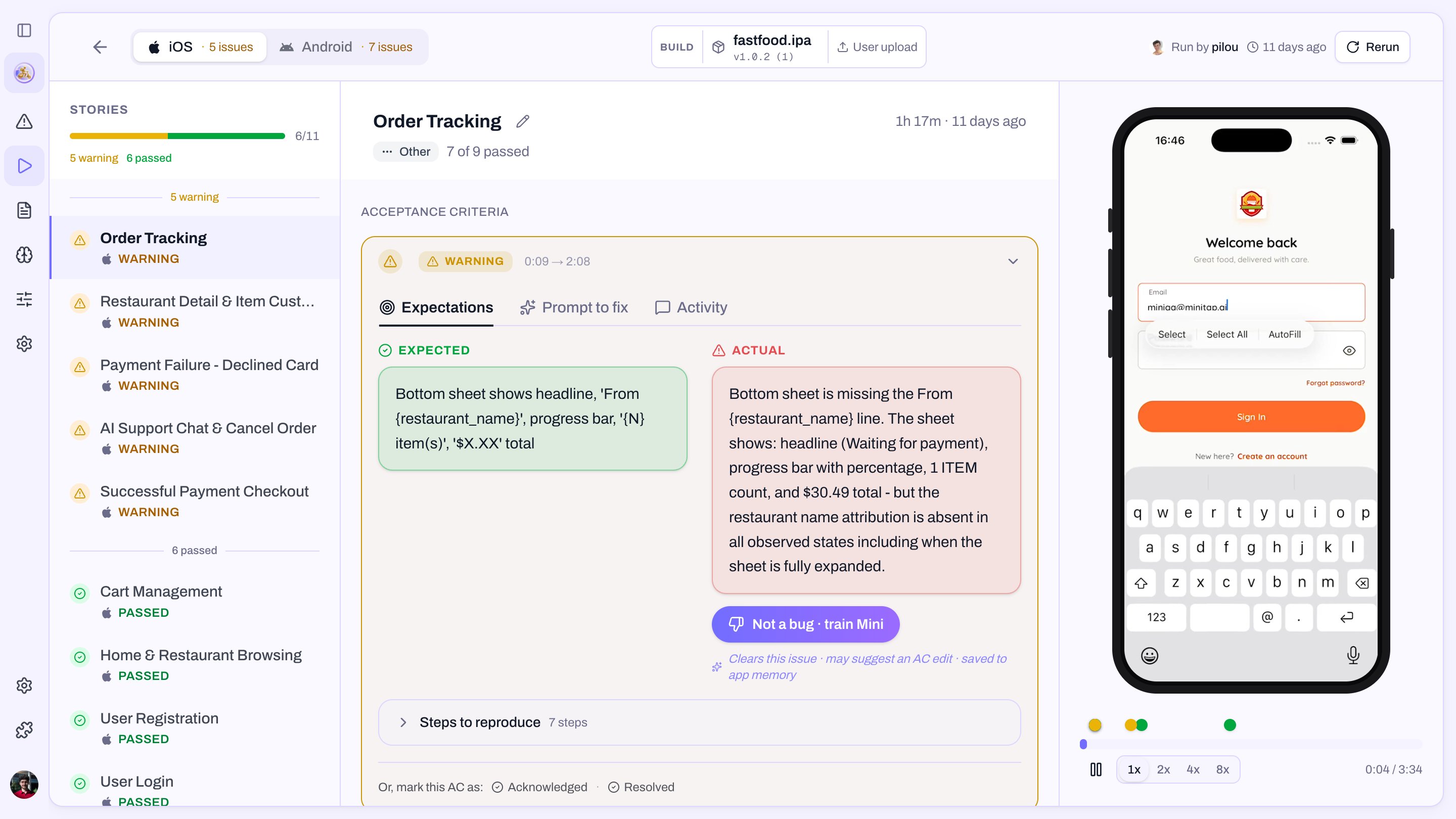
* **Passed** — every critical criterion held.
* **Warning** — every critical criterion held, at least one warning
criterion didn't.
* **Failed** — at least one critical criterion didn't hold.
* **Unprocessable** — Mini ran the story but couldn't grade it.
The first three are normal outcomes you triage. **Unprocessable** is
the one that means something is wrong before the test even gets a
chance — see [below](#when-the-verdict-is-unprocessable).
## Criterion list
Each criterion appears with its status and the agent's evidence:
* **✅ Passed** — what the agent saw that matched.
* **❌ Failed** — what was expected vs what the agent saw, with a
screenshot pinned to the moment of failure.
* **⚠️ Warning** — the criterion is non-critical and didn't hold.
Click any criterion to jump to that moment in the video.
## Video + timeline
A continuous recording of the agent driving the app. The timeline
underneath marks each criterion's start/end, so you can scrub straight
to the failure.
## Fix prompt
Every failed criterion exposes a **Copy fix prompt** button. The
prompt is a ready-to-paste text block Mini wrote while running the
story, containing three things:
1. **The root cause** — what went wrong and why.
2. **Steps to reproduce** — the path the agent took into the failure.
3. **A concrete proposed fix** — a starting point, not a final answer.
Paste it into Cursor or Claude Code. Your IDE has the rest of your
codebase in context, so the fix prompt plus that context is usually
enough for the agent to open a PR.
## Verdict header
* **Passed** — every critical criterion held.
* **Warning** — every critical criterion held, at least one warning
criterion didn't.
* **Failed** — at least one critical criterion didn't hold.
* **Unprocessable** — Mini ran the story but couldn't grade it.
The first three are normal outcomes you triage. **Unprocessable** is
the one that means something is wrong before the test even gets a
chance — see [below](#when-the-verdict-is-unprocessable).
## Criterion list
Each criterion appears with its status and the agent's evidence:
* **✅ Passed** — what the agent saw that matched.
* **❌ Failed** — what was expected vs what the agent saw, with a
screenshot pinned to the moment of failure.
* **⚠️ Warning** — the criterion is non-critical and didn't hold.
Click any criterion to jump to that moment in the video.
## Video + timeline
A continuous recording of the agent driving the app. The timeline
underneath marks each criterion's start/end, so you can scrub straight
to the failure.
## Fix prompt
Every failed criterion exposes a **Copy fix prompt** button. The
prompt is a ready-to-paste text block Mini wrote while running the
story, containing three things:
1. **The root cause** — what went wrong and why.
2. **Steps to reproduce** — the path the agent took into the failure.
3. **A concrete proposed fix** — a starting point, not a final answer.
Paste it into Cursor or Claude Code. Your IDE has the rest of your
codebase in context, so the fix prompt plus that context is usually
enough for the agent to open a PR.
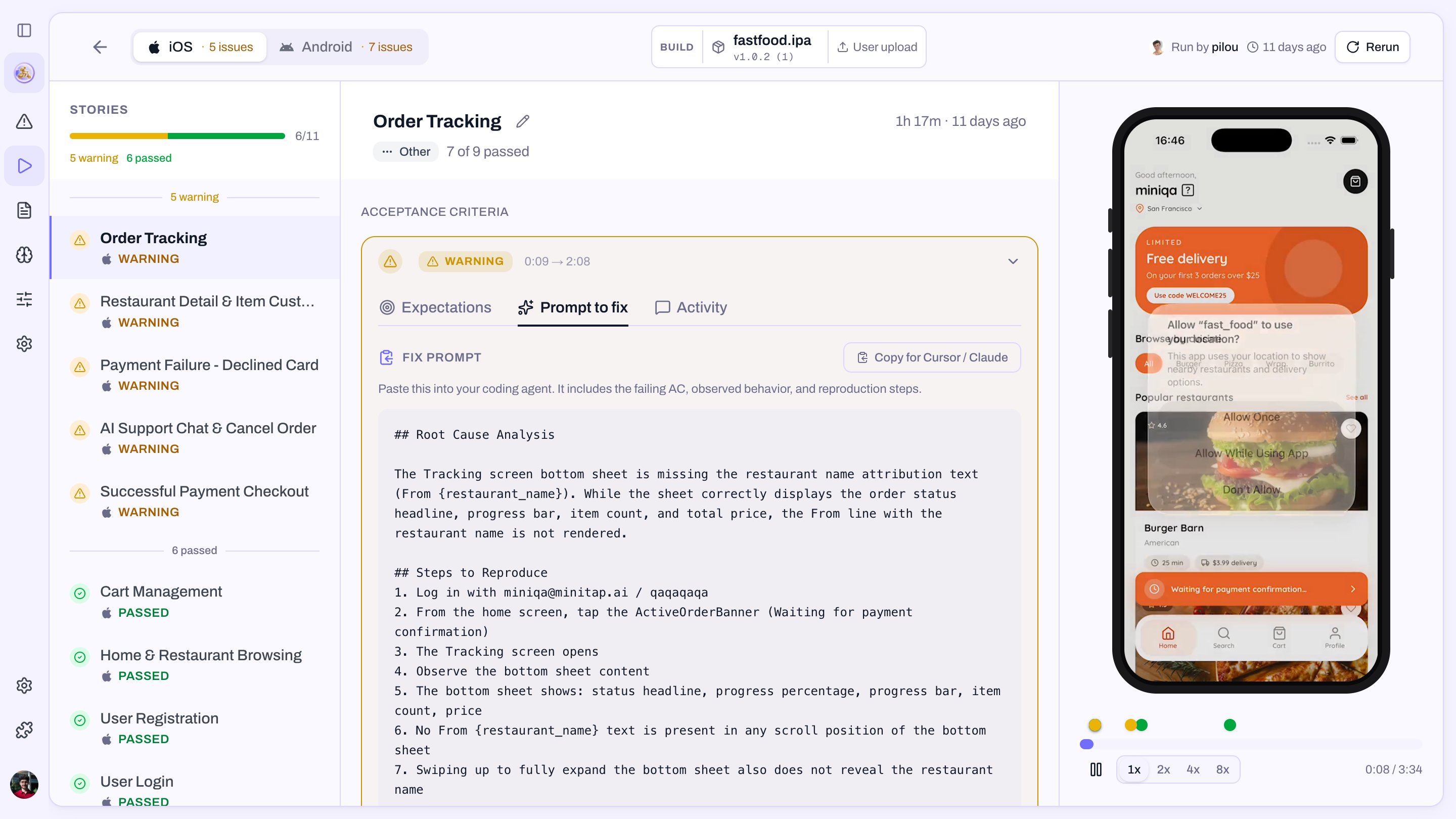 The fix prompt is deliberately prose — no screenshot URLs, no log
dumps. The video and the criterion detail above already cover the
evidence; the fix prompt is what you hand the IDE.
### Build fix prompts
When a build itself fails to compile or install — distinct from a
story failing on a healthy build — the build status panel exposes its
own **Copy fix prompt** button. Same shape: root cause, repro,
proposed fix. Use it when the run shows up as Unprocessable because
the build never made it onto a device.
## When the verdict is Unprocessable
Unprocessable means Mini ran the story but couldn't produce a real
grade — every acceptance criterion ended up either un-evaluable or
blocked by something upstream. The header explains which case it was.
The common ones:
* **The build is broken** — won't install, crashes on launch, or the
bundle is malformed. Open the build panel and use its fix prompt.
* **Sign-in failed** — Mini couldn't get past auth, so nothing
downstream is testable. Attach a working
[profile](/docs/minitest/suite/anatomy#profiles) to the user story.
* **The criteria don't fit the app** — usually a story copied from
another app, or a criterion that asks for something the app doesn't
do. Edit the story.
* **A hard blocker mid-story** — something earlier in the flow made
every remaining criterion unreachable. The first failed criterion is
the one to read.
If you see Unprocessable repeatedly across stories on the same build,
suspect the build before the suite.
The fix prompt is deliberately prose — no screenshot URLs, no log
dumps. The video and the criterion detail above already cover the
evidence; the fix prompt is what you hand the IDE.
### Build fix prompts
When a build itself fails to compile or install — distinct from a
story failing on a healthy build — the build status panel exposes its
own **Copy fix prompt** button. Same shape: root cause, repro,
proposed fix. Use it when the run shows up as Unprocessable because
the build never made it onto a device.
## When the verdict is Unprocessable
Unprocessable means Mini ran the story but couldn't produce a real
grade — every acceptance criterion ended up either un-evaluable or
blocked by something upstream. The header explains which case it was.
The common ones:
* **The build is broken** — won't install, crashes on launch, or the
bundle is malformed. Open the build panel and use its fix prompt.
* **Sign-in failed** — Mini couldn't get past auth, so nothing
downstream is testable. Attach a working
[profile](/docs/minitest/suite/anatomy#profiles) to the user story.
* **The criteria don't fit the app** — usually a story copied from
another app, or a criterion that asks for something the app doesn't
do. Edit the story.
* **A hard blocker mid-story** — something earlier in the flow made
every remaining criterion unreachable. The first failed criterion is
the one to read.
If you see Unprocessable repeatedly across stories on the same build,
suspect the build before the suite.